
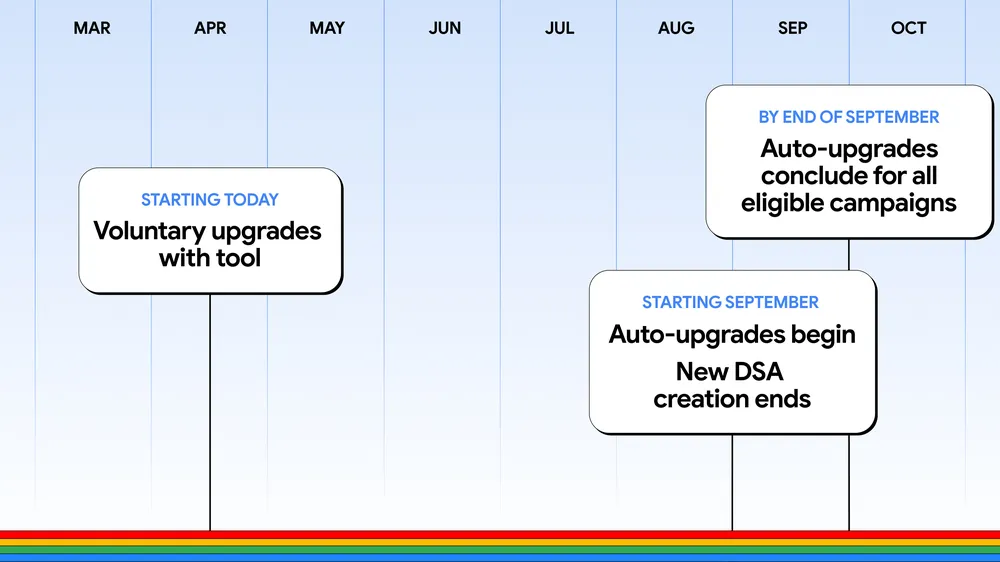

If you're running DSAs for clients, your campaigns are about to change without your permission.
Google announced that Dynamic Search Ads, automatically created assets, and campaign-level broad match are all moving to AI Max in September 2026. New DSA creation ends. Existing campaigns auto-upgrade. You'll get notifications, but you don't get to opt out.
For agencies juggling 5, 10, or 20 client accounts, this isn't a small thing. AI Max changes how ads match queries, how copy gets generated, and which landing pages actually serve. Done well, it outperforms DSA. Done carelessly, you get broken landing pages, off-brand copy, and a generic campaign that's quietly bidding on your client's own brand name without telling you.
So a quick primer on what AI Max is, and then the parts of the migration that will bite if you don't handle them.
What you're actually upgrading to
AI Max sits on top of an existing Search campaign. It's not a new campaign type. There are three things it changes.
Search term matching expands beyond the keywords you set, using broad match and what Google calls "keywordless" technology. It learns from existing keywords, ad copy, and URLs to find queries that aren't on your list but still fit the business. In the search terms report, these show up segmented as AI_MAX_KEYWORDLESS or AI_MAX_BROAD_MATCH.
Text customization is the rebranding of automatically created assets. Same general idea, but smarter. It pulls from landing pages and existing ads and uses generative AI to create headlines and descriptions tailored to each specific search.
Final URL expansion sends users to the most relevant page on the client's site, rather than the URL written into the ad. Someone searches for "vegan running shoes," the client has a vegan collection page, AI Max routes to that page even if your ad pointed to the general running shoe category.
Google reports the full feature suite delivers 7% more conversions or conversion value at similar CPA/ROAS compared to using search term matching alone. The earlier beta numbers were 14% lift on average and 27% for campaigns leaning heavily on exact and phrase match. BYD ran AI Max in beta and saw 24% more leads at 26% lower cost.
Worth being skeptical of all that, the same way you'd be skeptical of any vendor's first-party performance stat. But the broader pattern of more reach, better creative matching, and fewer manual rules tracks with what most agencies are seeing in their own client accounts.
The timeline
Voluntary upgrades are happening now. DSA users get migration tools to port historical settings into standard ad groups. ACA and broad-match users see a banner in the UI inviting them to switch.
Starting in September, automatic upgrades begin. New DSA creation ends across the UI, Google Ads Editor, and the API. Eligible campaigns finish migrating by the end of the month.
Google says the auto-upgrades will mirror your legacy setup. In practice, DSA users have all three features enabled, with URL controls preserved. ACA users get search term matching and text customization on. Broad-match-setting users get search term matching on. Sensible defaults if you do nothing. Less ideal if your clients have specific needs that the defaults don't address.
The parts that will bite you
A few things in AI Max don't really come up until you're already inside an account, and at that point, the damage is done.
Start with tracking templates. AI Max introduces dynamic landing pages through final URL expansion, and if a client uses a tracking template that doesn't pass query parameters cleanly, expanded landing pages can return 404 errors. Test the dynamic URL pattern with the existing tracking template before you flip AI Max on, because nobody enjoys finding out from a client that the campaign, which was supposed to lift conversions, has been serving 404s for three days.
Brand cannibalization is the bigger one. When you turn AI Max on for a generic, non-brand campaign, it can start bidding on the client's own brand terms. If the client has a separate, optimized brand campaign running an exact match, AI Max will eat into it and inflate CPCs across the account. The fix is a brand-exclusion list at the campaign level that includes the client's own brand. Do this before turning AI Max on, not after you've already paid for a few hundred clicks at the wrong CPC. Same logic for competitor brands the client has agreed not to bid on, since broad expansion doesn't know about your client's legal commitments.
URL exclusions matter more than they sound like they would. Final URL expansion will route paid traffic to whatever landing page on the site looks most relevant to the search. For most clients that's fine. For clients with old blog posts, expired promo pages, careers pages, or thin content, you need URL exclusions at the campaign level on the directories you don't want serving. URL inclusions at the ad group level are useful when you want to constrain delivery to specific themed pages, like product collections or service pages.
Pinned responsive search ad assets get deprioritized when final URL expansion is on. If a client has compliance copy or legal disclaimers pinned to position one, AI Max can ignore the pin if it picks a different landing page. Either turn final URL expansion off for that campaign or rework the compliance copy into the asset pool flexibly enough that any reasonable variation still complies.
Text guidelines deserve their own section
Google rolled text guidelines out globally in February 2026, and they're the most useful new control AI Max has added. Two mechanisms.
Term exclusions are exact strings you never want appearing in an AI-generated asset. Up to 25 per campaign, capped at 30 characters each, case-insensitive. Useful for competitor brand names, banned compliance words, or language-specific terms.
Messaging restrictions are natural-language rules. Up to 40 per campaign, capped at 300 characters each. They handle concepts and tone rather than exact strings, and they work across languages. This is where you put rules like "Don't imply our products are cheap" or "Never reference specific cities" or "Don't use slang, exclamation marks, or caps-lock emphasis."
Hard rules work, soft suggestions don't. The AI can't operationalize "keep it professional" in any consistent way, but it can operationalize a categorical instruction with no wiggle room. Include examples when the rule is ambiguous. "Avoid mention of any prices, e.g., $45/night or $4,567" gives the AI something concrete to pattern-match against. "Avoid mention of prices" doesn't.
Don't burn term-exclusion slots on translations of the same concept. If you need to ban "cheap" across English, Spanish, and German campaigns, you've spent three of your 25 slots on one idea. Better to put cross-language concepts into messaging restrictions, since those operate semantically, and save term exclusions for language-specific compliance strings or exact brand names.
For regulated clients in financial services, healthcare, or legal, this isn't optional. Generated copy will drift into language that violates compliance rules if you don't lock it down. Configure restrictions before launch, and review the asset report weekly for at least the first month.
Where the lift is real and where it isn't
Worth being honest about who actually benefits.
Campaigns that lean heavily on exact and phrase match keywords are the ones with room to gain. The 27% lift Google quotes for this segment is the strongest case for AI Max, because those campaigns are leaving query coverage on the table that broad match plus keywordless can pick up.
Mature campaigns with diversified match types, strong landing pages, and a tight keyword build will see something closer to the 7-14% range. Sometimes less. If you set client expectations using Google's headline numbers, you'll spend Q4 explaining why the lift didn't materialize.
Reporting is better than Performance Max, but it still has rough edges. The new search terms report includes headlines and landing pages alongside queries, which is genuinely useful. Match-type segmentation lets you isolate AI Max-driven traffic. But the AI Max search term ad combination view and the standard search term view aren't mutually exclusive, so summing both will overcount clicks. If you're building dashboards, watch for that.


 Gray Digital Group
 Blitzy
 PermitFlow
 Dj Haer Jr

