
Spreadsheets Are Not a Collaboration Tool
Google Ads Editor is powerful. But the export? Rows and columns that mean nothing to clients who don't live in ad platforms.
You know what a campaign structure looks like. Your client sees a wall of text with cryptic column headers. They approve it because they trust you, not because they understood it.
That's a problem. When clients don't understand what they're approving, they second-guess it later. "Wait, I didn't realize that headline would say that." Now you're making post-launch edits that should have been caught in review.
A Preview Clients Actually Understand
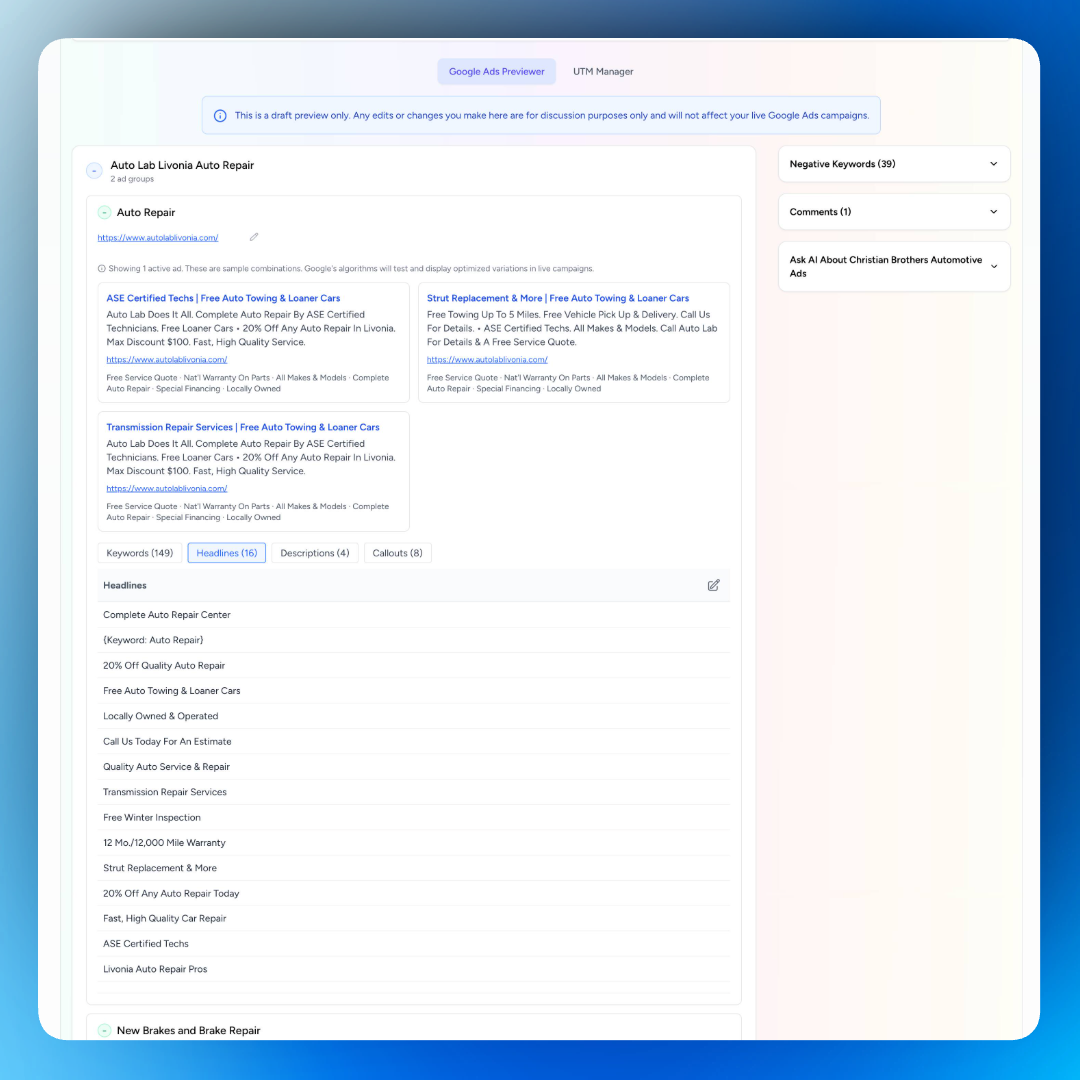
SmartMetrics transforms your Google Ads draft into an interactive, visual preview. Campaigns. Ad groups. Ads. All laid out in a clean structure anyone can follow.
No spreadsheet decoding required. Clients see their campaigns the way normal humans think about them.
Connect a Google Ads account directly, or upload a CSV from Google Ads Editor. SmartMetrics handles the rest.
Real Collaboration, Not Email Threads
Here's where it gets good.
Clients can suggest edits to headlines, descriptions, and keywords right inside the preview. They can add negative keywords. They can leave comments on specific ads.
All feedback stays attached to the thing it's about. No more emails saying "On the third ad in the second ad group, can we change the second headline?" You see exactly what they mean.
You review their suggestions, make adjustments, and move forward. What used to take three rounds of emails happens in one session.
AI That Actually Helps
Stuck on headline ideas? Need keyword suggestions? The built-in AI assistant knows your client's website and business context.
Ask it for better copy options. Get keyword ideas based on the campaign goals. Brainstorm variations without leaving the preview.
Your client can use it too. They're not sure about a headline? They ask the AI for alternatives. They suggest one back to you. Collaboration gets faster when everyone has a creative partner.
One Click to Go Live
Approval done. Changes made. Now what?
With most workflows, you manually transfer everything back into Google Ads Editor. Copy. Paste. Double-check. Hope you didn't miss anything.
SmartMetrics lets you push the approved version directly back into Google Ads. One click. No manual re-entry. No transcription errors.
You go from approved to live in minutes.
UTM Campaign Builder
Tracking breaks when UTM parameters are inconsistent. One campaign uses "google_ads" as the source. Another uses "googleads." A third uses "gads." Your analytics become a mess of duplicate entries that should be the same thing.
The UTM Campaign Builder keeps everyone aligned. Create standardized UTM templates for each campaign. Define your naming conventions once. Generate consistent tracking URLs every time.
Share the UTM manager with your clients through their portal. They see every tracked link in one organized view. When they need a new URL for a landing page or email, they generate it themselves using your approved parameters.
No more Slack messages asking "what UTM should I use for this?" No more clients creating rogue parameters that pollute your data. Everyone works from the same system.
All UTM links stay organized by campaign. You can see exactly which URLs are live, export them for reporting, and update parameters across multiple links when campaigns evolve.
How Agencies Use This
New campaign launches: Build your campaign in Google Ads Editor, upload the CSV, share the preview link. Client reviews and approves before anything goes live.
Monthly refresh cycles: Need to update ad copy across multiple campaigns? Preview the changes, get approval, push them live. All in one workflow.
Client onboarding: Show new clients exactly what you're planning to run. They see the structure, understand the strategy, and feel confident in your approach.
Collaborative optimization: Client has ideas for new keywords or ad angles? They add them directly in the preview. You review and incorporate what works.
UTM consistency: Set up your UTM naming conventions at the start of the engagement. Clients generate their own tracked links without breaking your analytics. Everyone stays aligned.
Why This Beats the Spreadsheet-and-Email Method
Spreadsheets work for data storage. They fail at communication.
Your client doesn't want to decode a CSV. They want to see their ads, understand them, and give feedback without feeling lost.
SmartMetrics bridges the gap between how you work and how clients think. You keep using Google Ads Editor. They get a preview that makes sense. Everyone collaborates in one place.
No more version confusion. No more scattered feedback. No more "which spreadsheet has the final approved copy?"
Get Started
Upload your CSV or connect the Google Ads account. Share the preview link with your client. Collaborate on copy, keywords, and structure in real time.
When it's approved, push it live with one click. Campaign launched. Client happy. Hours saved.
Ready to get faster campaign approvals?