
The Access Request Problem
You need access to five platforms. Each platform has different steps. Each client has different technical skills.
What should take ten minutes turns into a week of emails.
Google Ads? "Go to Admin, then Access and Security, then add this email as Standard access." GA4? Different steps entirely. Meta Business Manager? Yeah, good luck explaining that one over email.
You record Loom videos. Write custom instructions. Jump on calls just to walk someone through clicking buttons.
This isn't what your client hired you for. And it makes your onboarding feel clunky before the real work even starts.
Guided Steps for Every Platform
SmartMetrics knows exactly how to grant access on Google Ads, GA4, Meta, LinkedIn, and more.
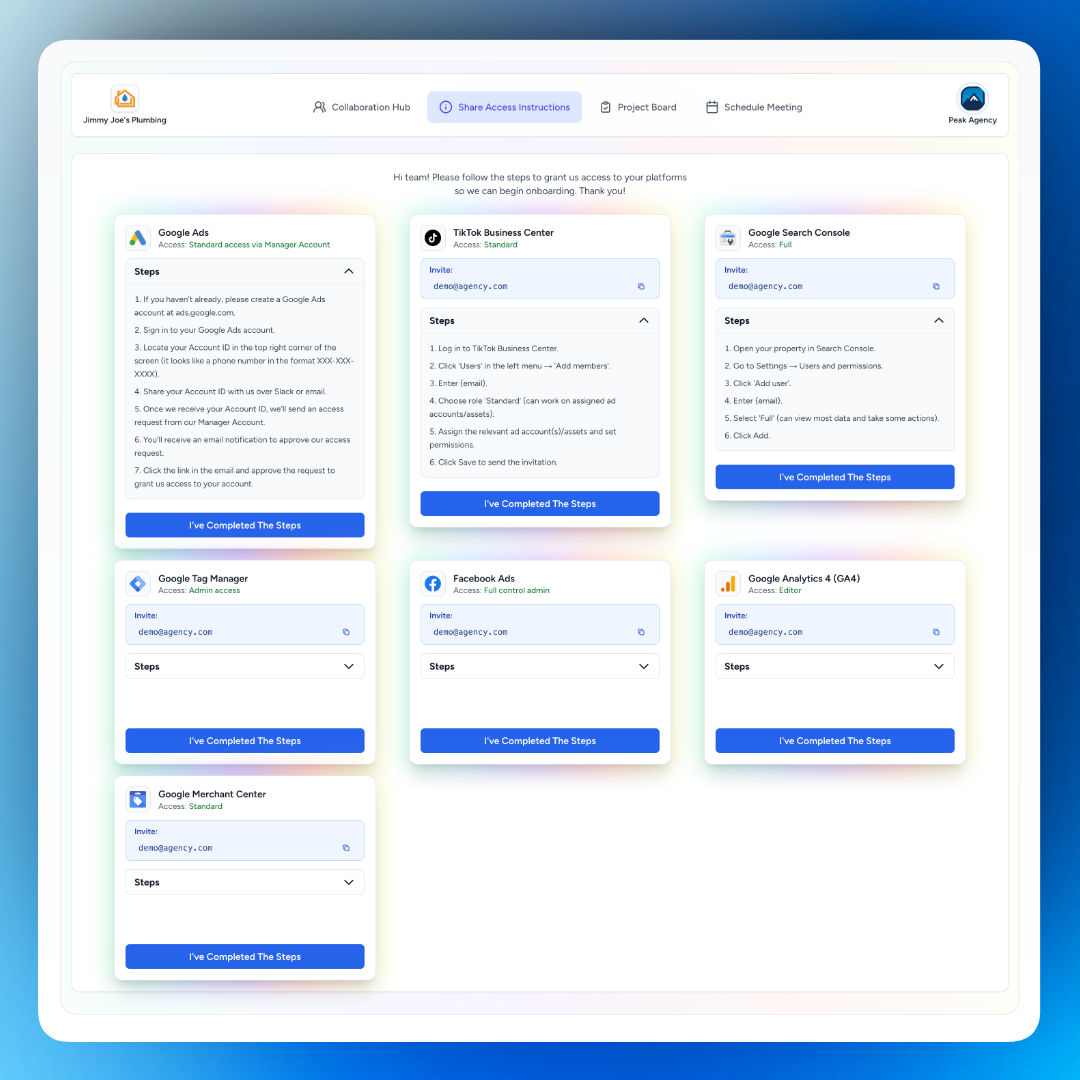
When you request access, it generates precise, step-by-step instructions tailored to each platform. Not generic instructions. The exact steps. With the exact email address you need them to add.
Your client opens their portal, sees the instructions, and follows them. They don't need to interpret your email. They don't need to watch a five-minute video. They just do it.
Automatic Verification
The worst part of the old process? You never knew if it worked.
Client says they granted access. You check. Nothing there. Did they add the wrong email? Wrong permission level? Wrong account? You email back asking them to double-check. They get annoyed. You get frustrated.
SmartMetrics handles verification automatically. When your client finishes the steps, they click Verify. The system confirms the access is set up correctly. You get notified instantly.
No "just checking in" emails. No wondering. You know it's done because the system confirmed it.
Password Manager for Sensitive Credentials
Some clients don't want to grant full platform access. They'd rather share login credentials directly.
That usually means storing passwords in Slack messages, email threads, or a random Google Doc. When you need to log in six months later, you're hunting through conversations trying to find it.
SmartMetrics includes a secure password manager built into each client record. Your clients can store login credentials directly in their portal. You access them when you need them. Everything encrypted. Everything organized.
No more "hey, what's the password again?" messages. No more storing credentials in plain text. Just open the client record and log in.
All Platform IDs in One Place
Once you have access, you need to keep track of account IDs.
GA4 property ID. Google Ads CID. Meta Business Manager ID. LinkedIn Campaign Manager ID.
Most agencies store these in a spreadsheet somewhere. Or in a Notion doc. Or in random email threads. When something breaks, you dig through files trying to find the right ID.
SmartMetrics stores all platform IDs in a single, organized record for each client. Onboarding? Check the record. Troubleshooting? Check the record. Setting up a new integration? Check the record.
Everything in one place. Always up to date.
Onboarding in Minutes, Not Days
Access delays kill momentum.
You signed the client. They're excited. They want to see results. But you're stuck waiting for admin permissions instead of doing actual work.
With SmartMetrics, access setup happens the same day. Often within the hour.
Your client gets the request, follows the steps, clicks verify, done. You start work immediately. The client sees you moving fast. Everyone wins.
How Agencies Use This
New client onboarding: Select all the platforms you need access to, enter your agency email, send the request. The client handles it from their portal. You get notified when it's complete.
Adding team members: New hire needs access to client accounts? Update the access email and resend. Same guided process, same instant verification.
Fixing access issues: Client accidentally removed your access? Send a new request. They follow the steps again. No awkward "can you re-add me?" conversations.
Audits and consultations: Taking on a quick audit project? Get access in minutes instead of delaying the entire engagement.
Storing sensitive credentials: Client prefers to share logins instead of granting access? Use the password manager. Everything stays secure and organized.
Get Started
Select your platforms. Enter your access email. Send the request.
Your client sees the steps in their portal, completes them, clicks verify. You get a notification. Access confirmed. Time to work.
Ready to streamline client access?