
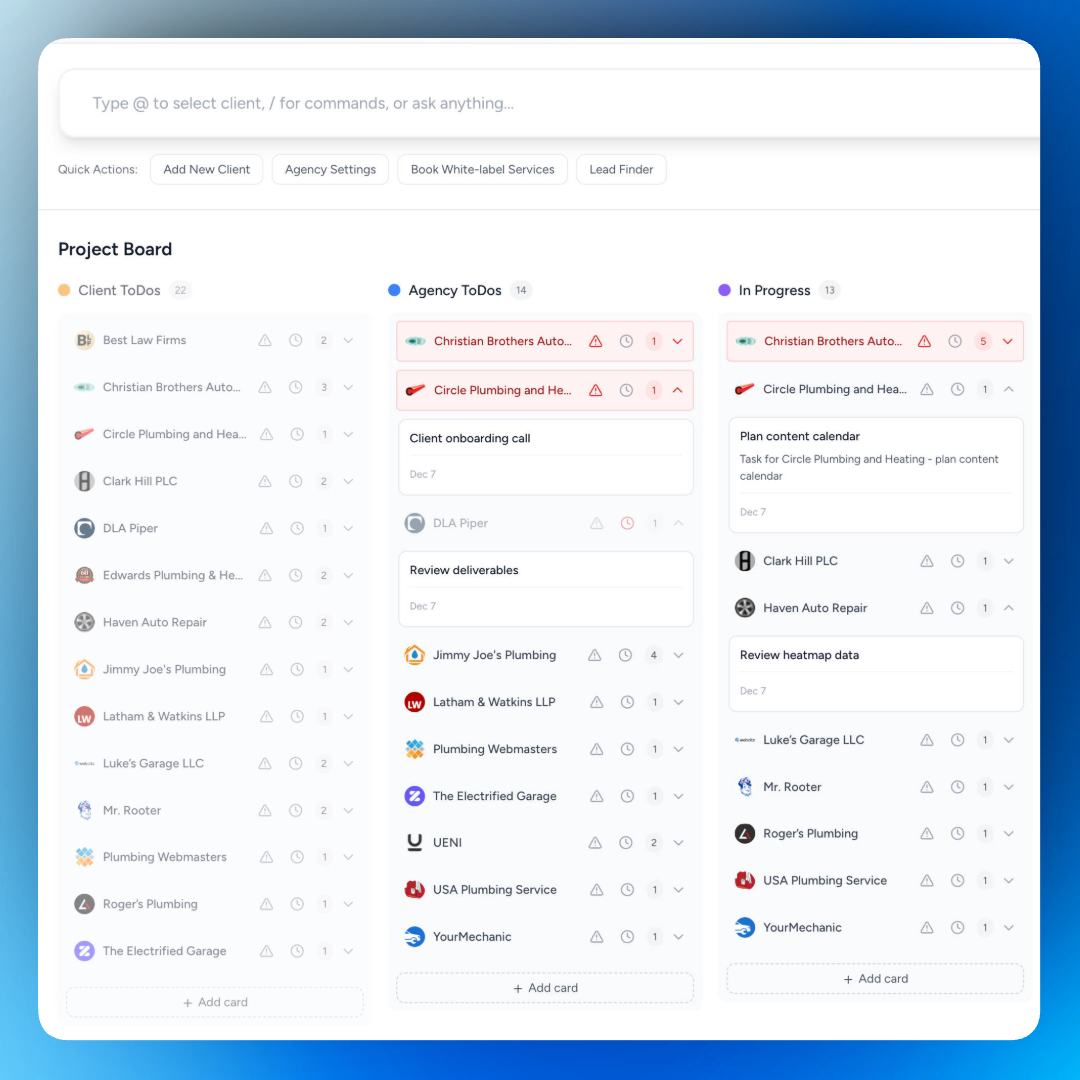
The Status Update Trap
Here's the cycle: You finish a task. You move on to the next one. Your client has no idea anything happened. So they email you. You pause your work to respond. You write a quick summary. They reply with a follow-up question. You answer that too.
Multiply this across ten clients. That's your week gone.
Some agencies try to solve this with weekly update calls. But those eat billable hours. Others send Friday recap emails. But those take time to write and clients barely read them.
The problem isn't communication. It's visibility. Clients ask for updates because they can't see what's happening.
One Board. Complete Transparency.
SmartMetrics gives you a shared Kanban board for every client. To Do. In Progress. Completed. Your client sees exactly where things stand without asking.
You update a task status? They see it instantly. You add a comment? They see it. You move something to Completed? They know before you tell them.
No more "just checking in" emails. No more status calls that could have been a glance at a board.
Paste Requirements. Get Tasks Instantly.
Got a project brief? Client sent over specs? Paste them into SmartMetrics and watch the magic happen.
AI reads your requirements and auto-generates task cards. Assign them to your team or the client. Save directly to the board. What used to take 30 minutes of manual card creation now takes seconds.
Client sends a website redesign brief with fifteen requirements? Paste it. SmartMetrics breaks it into actionable tasks, ready for your board. No typing. No formatting. No forgetting items buried in paragraph four.
You focus on the work. SmartMetrics handles the setup.
Clients Don't Need Another Login
Most project management tools require client accounts. Logins. Passwords. Permissions. Your client forgets their password, resets it, gets frustrated, stops checking.
SmartMetrics skips all that. Clients open a secure link. They see their board. Done.
No account creation. No onboarding friction. They click and they're in.
You See Everything. Clients See What's Theirs.
This is where SmartMetrics gets smart.
Your agency works from a single master board. Every client. Every project. Every task. One unified view for your team to prioritize and track progress across the board.
But when a client opens their portal, they only see their projects. Their tasks. Their updates. Clean and focused.
You get the big picture. They get exactly what they need. Nobody gets overwhelmed.
Collaboration Without the Chaos
Clients can comment directly on tasks. They have feedback on the landing page copy? They leave a comment on that task. You get notified. You respond in context.
Compare this to feedback via email: "I have some thoughts on the thing you sent last week. The second version, not the first one. Actually, maybe it was the third?"
When comments live on the task, there's no confusion about what anyone is referring to.
AI Summaries Keep Clients in the Loop
Not every client wants to check a Kanban board. Some just want the highlights.
SmartMetrics automatically generates AI summaries of project progress. Your client gets a clear, digestible overview of what moved forward this week. No effort from you. No manual recap emails.
They stay informed. You stay focused on work.
How Agencies Use This
Project kickoffs: Client sends requirements doc. Paste it into SmartMetrics. AI generates all the task cards. Board ready in seconds, not hours.
Weekly deliverables: Add this week's tasks to the board. Update status as you complete them. Your client watches progress happen in real time.
Campaign launches: Break the launch into phases. Clients see what's done, what's in progress, and what's coming next. No launch day surprises.
Ongoing retainers: Keep a running board of monthly deliverables. Clients always know what you're working on without scheduling a single call.
Collaborative projects: Need client input on specific tasks? Tag them. They comment directly. The conversation stays attached to the work.
Why This Beats Asana, Monday, or Trello
Those tools work great for internal teams. But they're built for project management, not client collaboration.
Sharing an Asana project with a client means they see your internal mess. Comments meant for your team. Tasks that don't involve them. A learning curve they didn't sign up for.
SmartMetrics is designed for client-facing work. Clients see a clean, filtered view of only what matters to them. No noise. No confusion. No training required.
Plus, it lives inside the same portal where they see proposals, reports, and shared resources. One place for everything instead of another tool to check.
Get Started
Create a board. Paste your requirements and let AI generate the tasks. Share the link with your client.
They see progress as it happens. You answer fewer status emails. Everyone stays aligned without the back and forth.
Ready to eliminate status update emails?