

Server-side tracking (in plain English)
If your analytics numbers have started to feel a little… off lately, you’re not imagining it. Between cookie restrictions, browser privacy features (hello, Safari), and ad blockers, a lot of the data that used to flow freely from the browser just doesn’t make it to Google Analytics, Meta, and the rest of your stack anymore.
That’s where server-side tracking comes in. Done right, it helps you collect cleaner event data, improve attribution, and stay on the right side of privacy expectations - without turning your site into a slow, script-heavy mess.
What is server-side tracking?
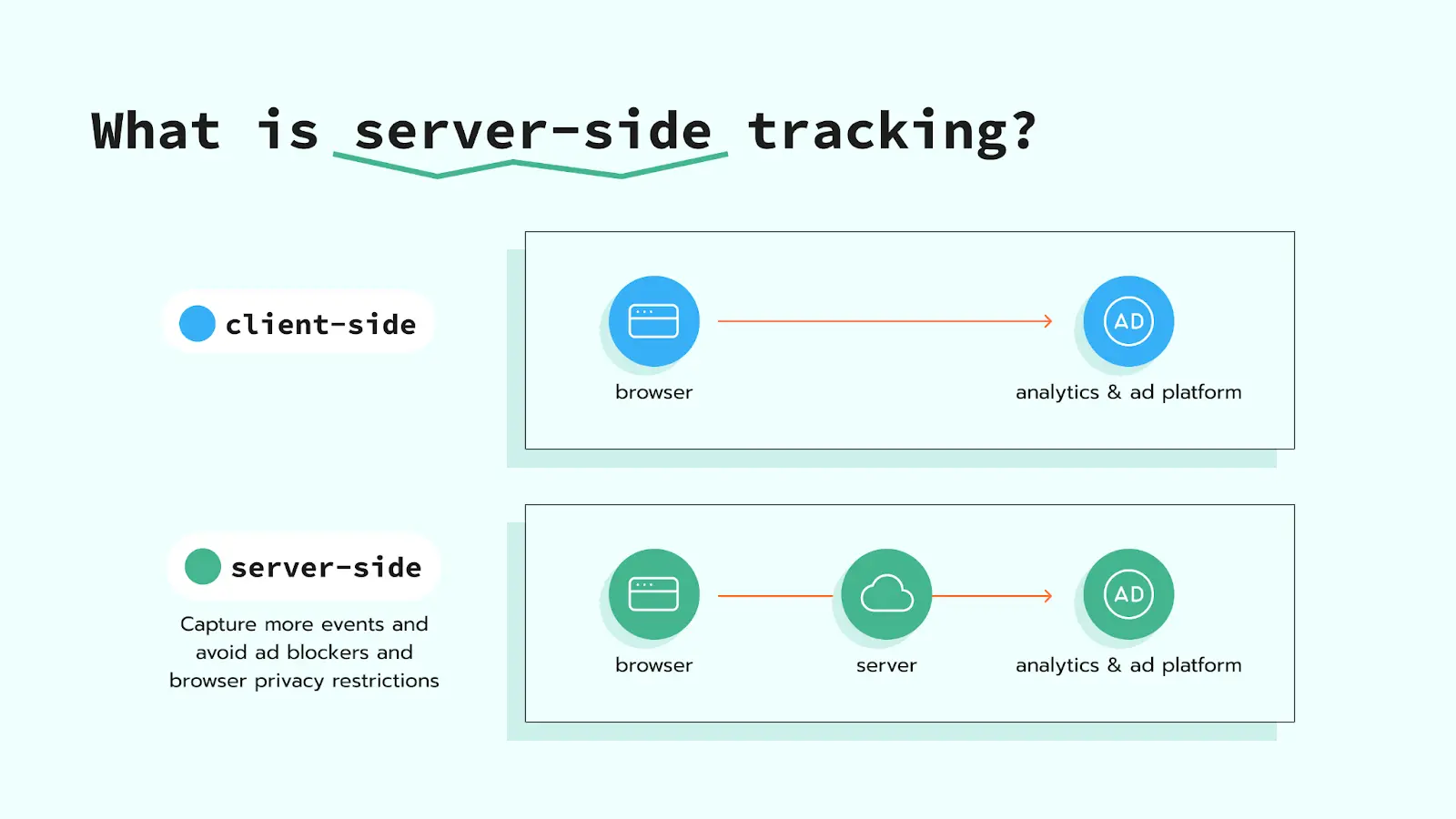
Server-side tracking means your website sends tracking events to your server first, and then your server forwards the data to third-party tools (GA4, Meta, TikTok, etc.).
In other words, instead of every vendor script firing directly from the user’s browser, you create a controlled “handoff” point. You decide what gets passed along, what gets filtered out, and how it’s formatted.
Client-side vs. server-side tracking: what actually changes?
With client-side tracking, the browser loads multiple third-party scripts and sends requests directly to those vendors. That approach is increasingly fragile:
- Browsers block or limit cookies (especially third-party cookies and short-lived JS-set cookies).
- Ad blockers often stop common analytics requests altogether.
- Site performance suffers as more tags pile up.
With server-side tracking, the browser typically sends one stream of events to a first-party endpoint (a subdomain you control). Your server then routes events to the right destinations using server-to-server integrations.
How does server-side tracking work?
- A user takes an action on your site (pageview, add-to-cart, purchase, form submission).
- Your web container sends an event to your server endpoint (often via a GTM server container).
- The server container processes the event: validates it, enriches it (optional), and removes sensitive fields if needed.
- The server forwards the event to platforms such as GA4 and Meta via server-side tags / APIs (e.g., the Meta Conversions API).
Why teams switch to server-side analytics
1) More reliable measurement
Because events are routed through a first-party endpoint, you typically lose less data to browser restrictions and ad blockers. You still won’t capture everything (nothing does), but you’ll usually see tighter alignment between analytics and actual business outcomes.
2) Better site performance
Fewer heavy scripts running in the browser can mean faster load times and a smoother user experience—especially on mobile.
3) Stronger privacy controls
Server-side setups give you a practical place to enforce rules: exclude unnecessary parameters, hash identifiers where appropriate, and reduce what gets shared with external vendors.
Stape.io implementation: a practical way to get server-side tracking live
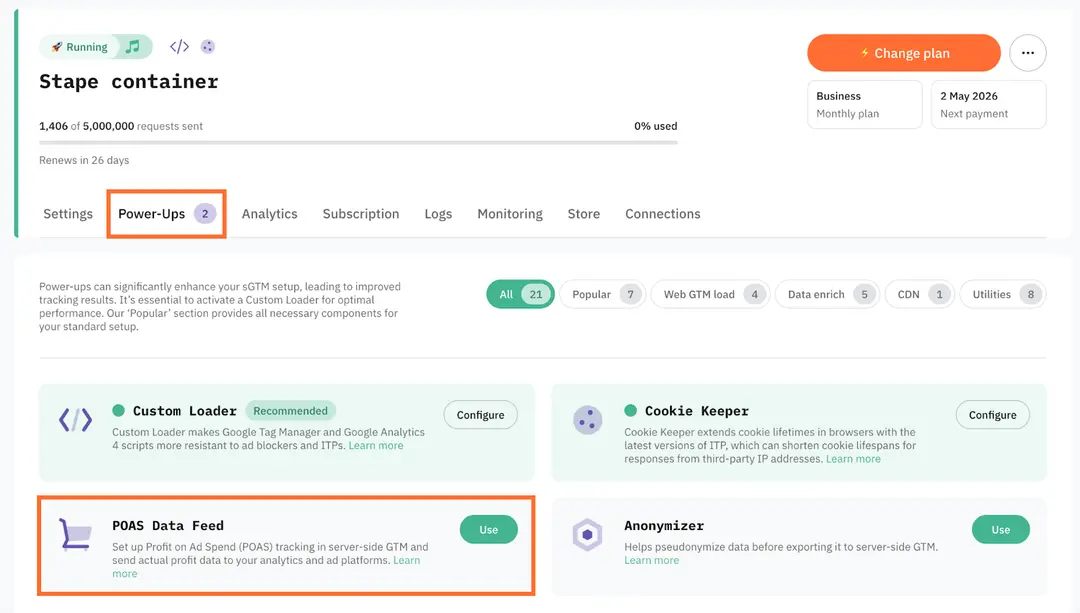
If you want server-side tracking without managing the full cloud infrastructure yourself, Stape.io is a popular option. It simplifies hosting and deployment for a GTM server container, and it’s often faster to stand up than to build everything from scratch in GCP/AWS.
A typical Stape.io implementation looks like this:
- Create a GTM Server container (separate from your Web container).
- Spin up hosting in Stape.io and connect it to your GTM Server container.
- Set a custom subdomain (e.g., track.yourdomain.com) and point it to the Stape endpoint. This is key for first-party collection.
- Update your web tracking so events send to the server endpoint (for example, GA4 configuration and event tags routed through server).
- Configure server-side destinations such as GA4 and the Meta Conversions API, then validate using test events and vendor diagnostics.
- QA and compare: confirm event parity, deduplication (browser + server), and attribution improvements before rolling out broadly.
Pro tip: the “it works” moment isn’t the finish line. The real value comes from clean event design, consistent naming, and correct deduplication across platforms.
Common pitfalls (and how to avoid them)
- Moving everything server-side immediately: Start with high-value events (purchase, lead, add-to-cart) and critical ad platforms first.
- No event governance: If your tracking plan is messy client-side, server-side can amplify the chaos. Clean taxonomy matters.
- Missing deduplication: For platforms like Meta, you need consistent event IDs so browser and server events don’t double-count.
- Assuming server-side = “immune to privacy”: You still need consent-aware implementation and careful data handling.
Want this implemented and optimized? SmartMetrics can handle it
Server-side tracking is one of those projects that can look straightforward in a tutorial - and then quietly turn into weeks of debugging, mismatched events, and attribution disputes across teams.
SmartMetrics can help you get it right end-to-end, including:
- Tracking strategy + event taxonomy (what to track, how to name it, and how to keep it consistent)
- Stape.io + GTM server container setup with a first-party subdomain
- GA4 + ad platform integrations (including Meta CAPI) with proper deduplication
- Data quality QA (debugging, validation, and ongoing monitoring)
- Attribution and performance reporting so your team can actually trust the numbers again
If you’re ready, SmartMetrics can scope your current tracking, recommend the fastest path to server-side tracking, and implement a clean setup you can maintain - without breaking your existing campaigns.
Final takeaway
Server-side tracking isn’t a buzzword - it’s a practical upgrade for more durable measurement in a privacy-first world. Whether you build in the cloud or use a hosted approach like Stape.io, the goal is the same: improve data reliability, performance, and control.
If you want a hands-on team to plan, implement, and tune it, SmartMetrics is ready to help.



 Gray Digital Group
 Blitzy
 PermitFlow
 Dj Haer Jr

