

Imagine if you could automate client account setup and welcome new clients in just minutes, not days. No more piles of paperwork or endless manual data entry slowing things down.
This guide is here to show you how agencies and businesses in 2026 can fully automate client account setup, clearing away friction and unlocking new levels of efficiency.
We’ll dive into the real challenges of onboarding, explore the undeniable benefits of automation, and walk through practical steps and tools to make the switch. You’ll also get a peek at what’s next for onboarding, so you’re ready to stay ahead of the curve.
The Challenges of Manual Client Account Setup
Manual client account setup can feel like an endless loop of paperwork and back-and-forth emails. Agencies often find themselves stuck in repetitive data entry, chasing missing information, and double-checking forms for errors. This old-school approach doesn’t just slow things down—it also opens the door to costly mistakes and unhappy clients.
When agencies rely on manual processes, it’s easy for errors to slip through the cracks. Human mistakes, like a typo in an email address or missing contract details, can delay project kickoffs. These delays add up. According to recent customer onboarding statistics, agencies risk losing up to 20 percent of renewals when onboarding isn’t smooth. It’s a stark reminder of why so many teams want to automate client account setup.
The drain on resources is just as real. Account managers might spend up to 30 percent of their week wrangling onboarding tasks, leaving less time for strategic work or building client relationships. The result? Projects get off to a slow start, and clients get frustrated waiting for access or answers.
Manual onboarding also brings compliance and security headaches. Sensitive client data can be mishandled or stored in unsecured locations, increasing the risk of breaches or regulatory issues. For agencies handling multiple clients, tracking who has access to what becomes a daily challenge.
Let’s not forget the hidden costs that eat away at profitability:
| Hidden Costs of Manual Onboarding | Impact on Agency |
|---|---|
| Untracked staff time | Lower margins |
| Client frustration | Increased churn |
| Missed upsell opportunities | Lost revenue |
Real-world examples show just how damaging slow onboarding can be. Some agencies have lost major accounts after a single mistake or delay, simply because the process felt clunky. As agencies grow, these old methods become even less sustainable. Teams can’t scale if they’re buried under paperwork.
That’s why so many are turning to technology to automate client account setup. It’s not just about speed—it’s about delivering a smoother, more reliable experience that helps agencies grow without the headaches.

Benefits of Automating Client Account Setup
Imagine transforming the way you bring on new clients. When you automate client account setup, you cut onboarding time from days to just minutes. Agencies no longer need to juggle repetitive forms or chase down missing data. Instead, automation handles the heavy lifting, freeing your team to focus on what really matters—building relationships and delivering value.

Accuracy is another game changer. Manual data entry is notorious for errors, but automation slashes mistake rates by up to 90%. This means fewer headaches for your team and a much smoother experience for clients. With standardized workflows, compliance steps are built right in, so sensitive information stays secure and audit-ready.
The client experience also gets a massive upgrade when you automate client account setup. Clients enjoy instant access to their own branded portals, where they can track progress, upload documents, and communicate with your team—all in one place. If you want to see what a seamless onboarding portal looks like, check out these branded client portal features that agencies are using to wow new clients and set the tone for a professional partnership.
Scalability is no longer a hurdle. Automation lets you handle multiple client onboarding processes at once, so you can grow your agency without sacrificing quality or speed. The impact on your bottom line is clear: agencies report time-to-revenue improving by up to 35%, and some have even doubled their client capacity after streamlining their onboarding process. When you automate client account setup, you’re not just saving time—you’re setting the stage for sustainable, profitable growth.
| Benefit | Manual Setup | Automated Setup |
|---|---|---|
| Onboarding Time | 3-5 days | 15-60 minutes |
| Data Entry Errors | Frequent | Reduced by 90% |
| Client Experience | Fragmented | Seamless, branded portal |
| Scalability | Limited | Unlimited clients |
| Time-to-Revenue | Slow | Up to 35% faster |
In the end, the choice to automate client account setup isn’t just about efficiency. It’s about delivering a better client experience, improving accuracy, and unlocking growth opportunities that manual processes simply can’t match.
Step-by-Step Guide to Automating Client Account Setup
Getting started with the journey to automate client account setup can feel overwhelming, but breaking it down makes it manageable. Here’s a step-by-step guide to help agencies transform their onboarding process, making it faster and more reliable.

Step 1: Map Your Current Onboarding Workflow
Before you can automate client account setup, you need a clear picture of your current process. Sit down with your team and list every step, from the moment a contract is signed to the first project kickoff. Use a process mapping tool to visualize each phase.
Look for bottlenecks, like repeated data entry or approval delays. These are usually where mistakes happen and time gets lost. Ask team members about their pain points to uncover hidden inefficiencies.
Most agencies discover that data collection and account provisioning take up the most time. By understanding your workflow, you’ll know exactly where to focus your automation efforts as you automate client account setup.
Step 2: Define Automation Goals and Success Metrics
Setting goals is essential if you want to automate client account setup successfully. Start by identifying what matters most—speed, accuracy, client satisfaction, or compliance. Once you know your priorities, pick key metrics to track, like onboarding time, error rates, or client Net Promoter Score.
Bring in stakeholders from sales, operations, and customer success to make sure everyone’s aligned. Their insights will help you set realistic targets and spot potential roadblocks.
For example, an agency might aim to cut onboarding time by 50 percent in six months. With clear goals, you’ll be able to measure progress and prove the value of your investment in automating client account setup.
Step 3: Choose the Right Automation Tools
Selecting the right platforms is critical when you automate client account setup. Look for tools that offer workflow automation, CRM integration, and branded client portals. Compare features like API or CSV imports, task automation, and security controls. Scalability and ease of use are non-negotiable, especially if you plan to grow.
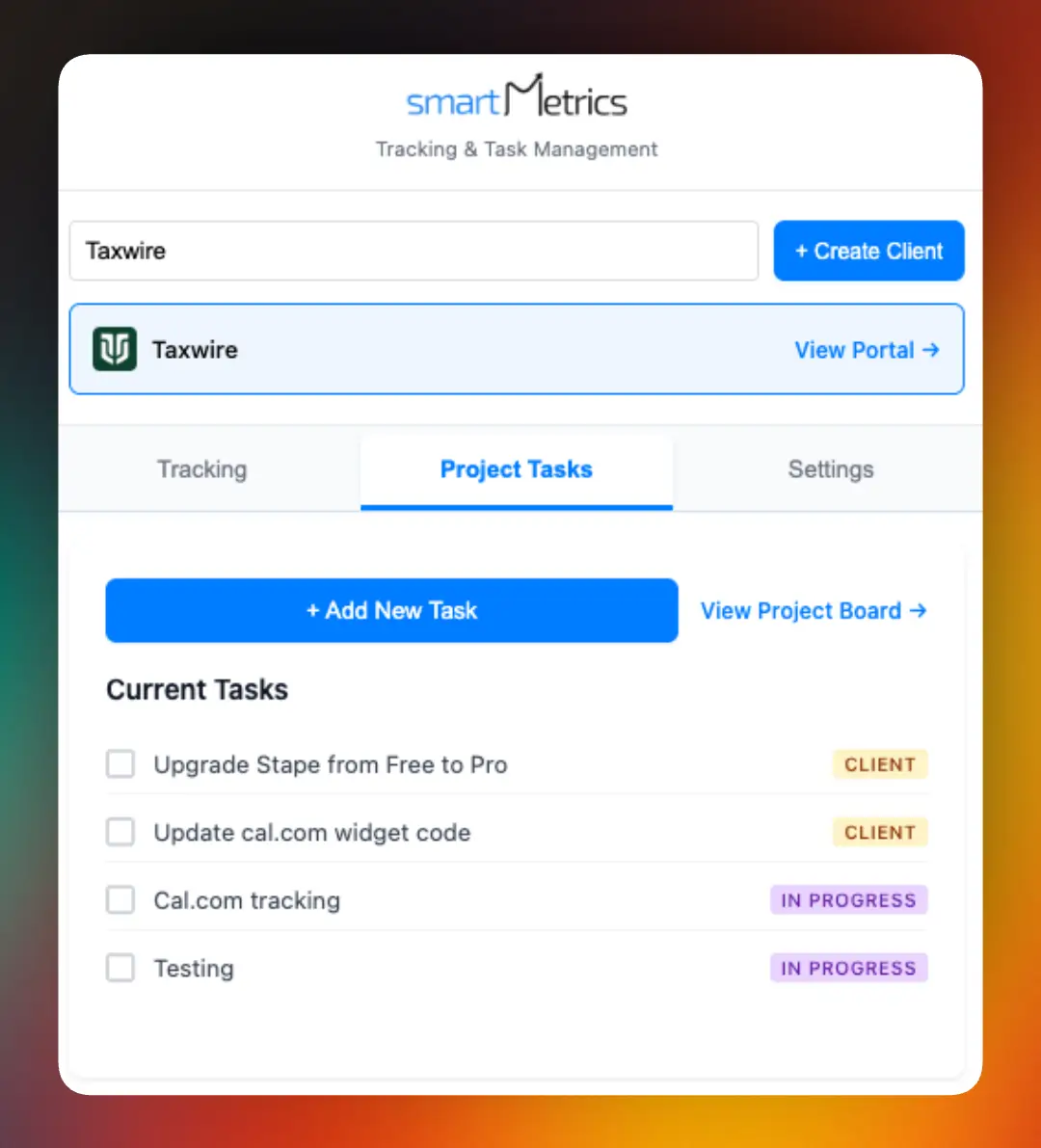
Popular solutions include SmartMetrics, Zapier, and HubSpot, but every agency has unique needs. Consider how well a tool integrates with your existing stack. For agencies needing custom workflows, custom integrations for onboarding automation can make all the difference.
Agencies using dedicated onboarding tools often report setup times that are twice as fast, making it easier to automate client account setup at scale.
Step 4: Build and Test Your Automated Workflow
Once you’ve chosen your tools, it’s time to configure your automated process. Set up automation rules, triggers, and data flows. Create templates for emails, forms, and other client communications to ensure consistency.
Test your workflow internally first. Run a pilot with a small group of clients to spot issues like data mapping errors or missed notifications. Gather feedback from both your team and clients.
Iterate and refine your setup until everything runs smoothly. A well-tested system will help you automate client account setup without unexpected hiccups during rollout.
Step 5: Train Your Team and Roll Out Automation
Your automation is only as good as the people using it. Develop clear training materials and standard operating procedures for every part of the new workflow. Host hands-on workshops and provide support channels for questions.
Encourage your team to share feedback as they adapt. Early buy-in and ongoing learning will help everyone get comfortable with the changes and make the most of your efforts to automate client account setup.
When teams understand the system, support tickets drop and onboarding becomes a smoother experience for everyone.
Step 6: Monitor, Optimize, and Scale
After launch, keep a close eye on your onboarding metrics and client feedback. Use analytics to identify new bottlenecks or inefficiencies. As you spot trends, refine your workflows and update your training materials.
Expand your automation to cover new services or client segments as you grow. The ability to automate client account setup across more areas means you can scale confidently without sacrificing quality.
Continuous improvement ensures your agency stays ahead of the curve and delivers a top-tier onboarding experience.
Key Features to Look for in Client Account Setup Automation Tools
Selecting the right platform to automate client account setup is crucial for agencies aiming to deliver a seamless onboarding experience. The right features not only remove friction for clients but also empower your team to work smarter, not harder.

Branded Experience and Seamless Integrations
A professional, branded client portal sets the tone for every new relationship. Look for automation tools that let you customize onboarding portals with your agency’s logo, colors, and messaging. This builds trust and gives clients a memorable first impression.
Equally important, integration capabilities let you connect with your favorite CRM, project management, billing, and communication tools. When you automate client account setup with robust integrations, your team avoids jumping between platforms. Platforms featuring a Collaboration hub for agencies can centralize conversations and tasks, keeping everyone aligned.
Automation, Tracking, and Security
Automated data collection and validation features are essential. They reduce manual entry errors and speed up onboarding. Real-time progress tracking means your team and clients always know what’s next. Automated notifications keep everyone in the loop, cutting down on missed steps or delays.
Security is non-negotiable. Choose solutions that provide role-based access, data encryption, and help you stay compliant with industry regulations. These features protect sensitive client data and build confidence in your process as you automate client account setup.
Customization and Analytics
No two agencies are exactly alike, so customizable workflows are a must. The best tools let you tailor onboarding steps to fit your unique process, whether you need multi-step approvals or industry-specific forms. White-label solutions, like those discussed in white-label tools for agencies, help you scale while maintaining your brand’s integrity.
Analytics dashboards are another key feature. They give you a bird’s-eye view of onboarding performance and client satisfaction. Agencies that automate client account setup and leverage real-time dashboards report up to 25% higher client satisfaction scores, making analytics a true differentiator.
Investing in these features ensures your agency can automate client account setup with confidence, delivering a professional experience and setting the stage for long-term success.
The Future of Automated Client Account Setup: Trends for 2026 and Beyond
Picture a future where agencies can automate client account setup so completely that onboarding feels effortless for both teams and clients. By 2026, smart automation will no longer be optional but a core driver of agency growth and client satisfaction.
Artificial intelligence is already reshaping onboarding, with predictive data entry, intelligent forms, and conversational chatbots becoming standard. According to Rocketlane's 2025 Customer Onboarding Report, personalization and AI-powered workflows will set the pace. Agencies will tailor onboarding journeys by client industry and type, while integrations will sync every tool for a seamless experience. At the same time, compliance and privacy features will keep evolving, helping agencies stay ahead of new regulations.
As more agencies automate client account setup, automation itself becomes a key differentiator. Early adopters are already seeing up to 50% faster client activation rates and scaling with confidence. By 2026, over 70% of agencies are expected to rely on end-to-end onboarding automation, making it the gold standard for delivering a world-class client experience.
Now that you’ve seen how automation can transform your agency’s onboarding process—reducing errors, saving time, and giving your clients an experience they’ll love—it’s the perfect moment to put these insights into action. Imagine welcoming new clients with branded portals and instant access, while your team focuses on building great relationships instead of wrestling with spreadsheets. If you’re ready to streamline your workflow and take your agency’s productivity to the next level, why not explore the tools we’ve discussed firsthand? You can Get Started for Free and see how easy it is to automate client account setup for yourself.




 Gray Digital Group
 Blitzy
 PermitFlow
 Dj Haer Jr

